Overview
Location: This metric is displayed on the 'Missing EHR Consent Status' column of the EHR Ops Dashboard. It can be found on the first tab entitled 'NIH Grant Award Metrics' under subgroup 'Organization Level' at the far right.
Motivation: The purpose of this section is to identify participants who should not have been included in the last submission AND participants who should be excluded from future submissions.
While our team runs additional checks to ensure that these participants are dropped later in the cleaning & curation process, this metric identifies the problem upstream to ensure that each site is only submitting data for participants active in the program and given consent for EHR data.
There are two cases that are identified:
- Should not have been included: Participants who were included in the last submission that had either withdrawn from the program or changed their EHR Consent status to 'No' before the submission date.
- Should be removed from future submissions: Participants in the last submission who have since either withdrawn from the program or changed their EHR Consent status to 'No'.
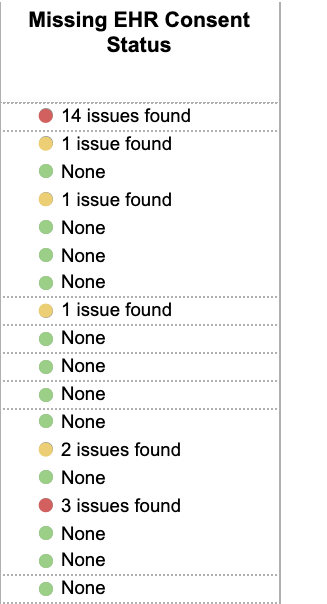
Breakdown of Categories:
There is a color indicator that will either be green, red, or yellow. Green indicates that there are currently no issues to be aware of. The label in these cases will also say 'None.' If the color is red or yellow, the label will display the total number of identified issues.
To see the specific breakdown of the issues, please hover over the metric, and the 'tool tip' will display a specific breakdown of the total number of issues into the Issue types.
- Marked as Red: A participant was included in the last submission who had withdrawn from the program (prior to the submission)
- Marked as Red: A participant was included in the last submission whose most current EHR Consent status is 'NO.' (Usually a result of a change in consent).
- Marked as Yellow: A participant has withdrawn from the program since the last submission. Please do not include them in future submissions.
- Marked as Yellow: Since the last submission, a participant has changed their EHR Consent status to: 'NO'. Please do not include them in future submissions.
If your last submission includes both Red and Yellow entries, the metric will revert to Red. The total tabulates all issues into the total number: 'X issues found.'
Next Steps:
We encourage all sites to check the dashboard frequently and after every submission (it refreshes every 24 hours).
If the dashboard flags issues in the 'Red' category, please contact us immediately via Zendesk Ticket, and our team will send over the flagged PIDs. Please exclude these participants and resubmit.
If the dashboard flags issues in the 'Yellow' category, please get in touch with us before your next submission, and our team will send over flagged PIDs to remove from future submissions.
Timeline:
Please monitor this section of the dashboard before & after every submission.
The EHR Ops team will also send out reminders with participants via Zendesk ticket periodically to sites in the 'Red' and 'Yellow' categories.